



From conversation to follow-up action.
Connect recurring questions to an integrated process. This means an employee does not have to re-enter or separately forward every request.
A customer question often requires more than an answer. With Archie, you connect the conversation to an action in your systems. From a return or appointment to the right follow-up, with checks where needed.
Archie Acts connects conversations to workflows in your systems.
My order is damaged.
Details via the linked system.
According to your returns and damage process.
The customer sees what will be carried out.
For example, a replacement or refund.
I want to reschedule my appointment.
Log in when the linked tool requires this.
Via the connected appointment system.
The customer checks the proposed change.
The change follows your configured process.
Can you forward my request?
Bring together the relevant information.
Route the request to the appropriate department.
For example, create or forward a case.
With the details needed for further follow-up.
Illustrative processes. Available actions and controls depend on your integrations and configuration.
Transferring data, forwarding a request and arranging a confirmation. Even after a good conversation, separate tasks often remain. Archie helps connect these steps.
Connect recurring questions to an integrated process. This means an employee does not have to re-enter or separately forward every request.
Route requests to the appropriate department or employee. Use workflows for updates, reminders and other follow-up steps after customer contact.
Determine which actions are available and when authentication or explicit confirmation is required. Ensure execution aligns with your process guidelines.
Choose a customer question that comes up often and for which the follow-up steps are clear. Bring together the required data, systems and controls. From this foundation, expand in a focused way.
Where does your team keep copying the same data? Which request is often forwarded? Choose a specific task and make clear when it has been handled correctly.
Connect the required tools and data via the Action Center. This allows a question in, for example, Conversations or Agent Assist to lead to an action in a connected system.
Determine when authentication or confirmation is required and which tasks an employee will continue to handle. Also align the feedback to the customer and the subsequent follow-up.
That depends on the available knowledge, connected tools and your process setup. Start with clear, repeatable steps. Determine which data and checks are needed for each action and when the work should remain with an employee.
Understand the difference between fixed workflows and AI agents
Employees remain involved in questions and exceptions that require human assessment. Archie can also help an employee start an action from Agent Assist. For each process, you configure how automation and human oversight work together.
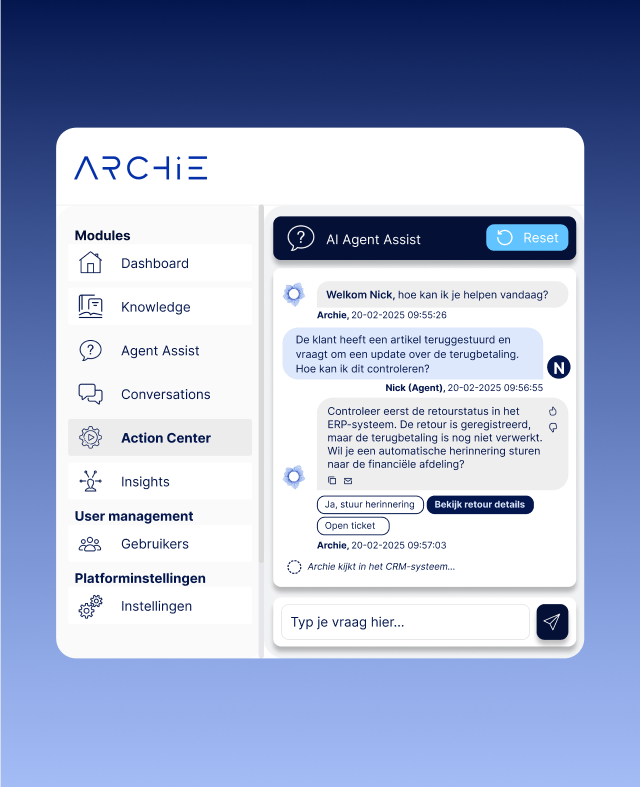
A useful action requires the right data, a suitable integration and clear controls. The Action Center brings these elements together.
Customer-related actions may require login and explicit confirmation. The customer sees the action before confirming it. Authentication and confirmation remain visible in the conversation history.
Through MCP, QA Pro, Conversations and Agent Assist can use external tools. Administrators determine which tools are available and test the connections from the Action Center.
Photos, scans and screenshots can be passed to suitable tools via a temporary secure link. The Action Center shows which tools support attachments.
Bring your CRM, ticketing and other business systems together around a specific process. We review the available integrations, required data and desired actions. This makes it clear which setup fits your way of working.
Where do you start with automation? Insights helps identify recurring, action-oriented customer questions. Use these signals to determine which process to tackle first.
Discover Archie Insights
At Xenos, customers look up their order via chatbot Xenna and indicate which product is damaged. This starts an automatic flow for a refund or replacement product. The process directly connects the customer question to its resolution and reduces the manual work involved in damage claims.
Read the Xenos caseFrom the first connected task to authentication and confirmation. This is what you need to know before you begin.
With customer service automation, you connect recurring questions to predefined follow-up steps. Through the Action Center, Archie can support linked actions, such as forwarding a request, creating a case or starting a customer process. The available actions depend on your systems and configuration.
Examples include routing requests, starting a return or appointment process, and arranging updates or reminders. For each task, we review which data is required, which integration is available and where control needs to remain.
Yes. Employees can be supported from Agent Assist when starting follow-up actions. Digital conversations can also be connected to a process via the Action Center. You decide how involved the employee remains for each application.
Customer-related actions may require explicit confirmation. The customer sees which action will be carried out before confirming it. During setup, you agree which actions require confirmation and how this fits your processes.
When a connected tool requires authentication, the customer logs in through the designated route. Passwords are not shared with the AI model. Authentication and confirmation remain visible in the conversation history.
Yes, with tools that support images as attachments. Photos, scans and screenshots can be passed via a temporary secure link. The Action Center shows which tools offer this capability.
MCP is a way to connect AI applications with external tools and systems. Within Archie, QA Pro, Conversations and Agent Assist can make use of this. Administrators determine which tools are available and can test connections.
Bring an example of a recurring process to your personal demo. We review the customer question, contact volumes, systems, data and controls. Together, we clarify the setup required, costs and implementation timeline.
Choose one process that currently involves a lot of manual work for your team. Together with an Archie expert, explore which steps you can connect and where checks are needed.
Your day-to-day operations are our starting point. Together with an Archie expert.