ARCHIE'S SKILLS

Four skills.Optimal service.

Archie brings together reliable knowledge, employee support, digital conversations and immediate actions in one AI platform for customer service.

From the right answer to the right action.

Archie Knows

Reliable knowledge. The foundation for great service.

Bring service knowledge together in one central, controlled knowledge base. Employees and AI use the same information, ensuring that answers, work instructions and follow-up actions are aligned.

  • Centrally managed knowledge
  • Review before publication
  • Knowledge from existing systems

Finding the right knowledge

Intelligent search functionality

Archie searches by meaning, using vector search technology and AI-driven embeddings. Poor search results and expired articles are excluded before they can influence an answer. Document fragments are given relevant context, ensuring that the knowledge base remains useful as it grows.

Manage and control knowledge

Controlled access

Manage which information is available to employees, customer experts and customers. Sensitive documents and knowledge for different audiences remain available separately.

Quality control and Article Pre-Check

Built-in COPC quality assurance helps keep information up to date, accurate and consistent. Article Pre-Check checks articles more than three times faster, while retaining the same validation capabilities.

Sticky Articles and scheduled publishing

Make important updates visible as Sticky Articles or pop-ups. Set the urgency and, where necessary, request a read confirmation. The four-eyes principle supports review before publication. Schedule articles in advance; they remain hidden until publication and Archie does not use them in answers.

Import, synchronize and translate

Knowledge Import & Sync

Connect with Salesforce Knowledge, Atlassian Confluence, Zendesk Guide, TOPdesk Knowledge Base or Contentful. Import knowledge once or keep externally managed articles synchronized and available as read-only. With Contentful, you decide how linked and standalone content is included.

Controlled synchronization

Preview which content will be included. Include categories, translations, images and attachments, and choose manual, scheduled, full or incremental synchronization.

Knowledge in multiple languages

Manage translations of articles, categories and work instructions by language. Long articles are translated in smaller sections. Archie distinguishes between manual and automatic translations and gives you control over overwriting changes. Manage languages for Domains, Topics, Intents and Subintents and see where translations are missing.

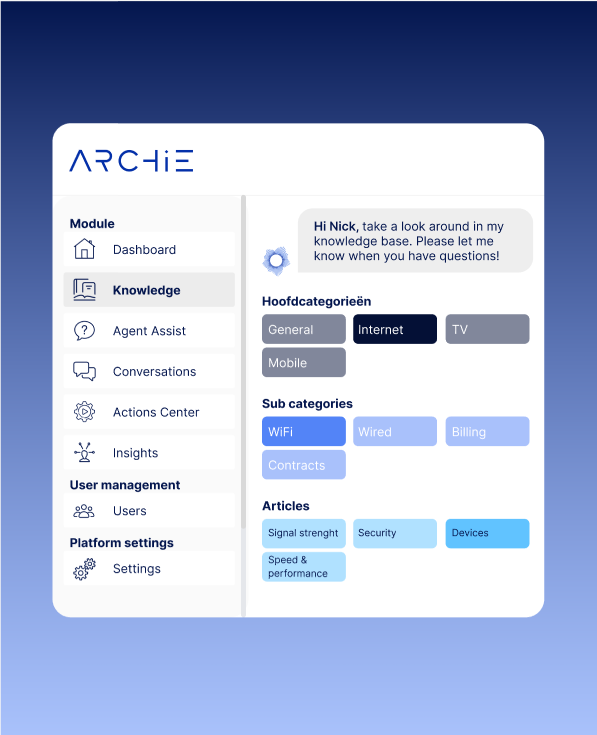
Product view of the Archie Knows Knowledge environment
Archie Knows · Knowledge
Archie Helps

More support for your team. More attention for the customer.

Support employees during conversations, when answering emails and when improving quality. Archie helps with answers and work instructions based on your own knowledge. Follow-up actions can be started through the Action Center.

  • Support during work
  • Answers based on your own knowledge
  • Insight into conversation quality

Agent Assist: support during the conversation

Quick access to relevant information

Employees get immediate access to relevant information to help customers faster and more effectively.

Answers based on verified knowledge

With retrieval-augmented generation (RAG), Archie bases answers on selected company information. This makes answers more consistent and easier to verify.

Archie in Microsoft Teams

Ask Archie questions in a 1-to-1 chat in Microsoft Teams. The assistant uses the existing Chatbot or Agent Assist configuration, including its personality, instructions and AI model, and displays relevant sources with the answer. With Chatbot settings, employees can also have images, PDFs and text files analyzed. Conversations are included in reports and No Answer analysis. Access remains managed through Microsoft Teams; the name, icon and colors can be customized.

Intelligence Engine & Expert Mode

Configure the multi-step Intelligence Engine for each chat channel and choose the AI model for each step. Greetings and thank-yous do not need to start a search. Tool Selection determines which connected tools are needed and limits unnecessary tool calls and authentication requests. Previously used tools remain available for follow-up questions. Expert Mode in QA Pro shows which parts of the question, searches, sources, tools and work instructions contribute to the answer and what is excluded. For complex requests, Archie can use multiple tools in sequence.

Feedback and quality improvement

Built-in COPC quality assurance helps keep information up to date and consistent. Use feedback to continuously improve the quality of the knowledge base.

Support for your KPIs

Faster access to relevant information can contribute to a shorter average handling time, higher first-contact resolution and fewer repeat contacts. The impact depends on how it is configured and used within your team.

Easy to use and manage

Employees find answers in a clear interface. Administrators keep the information and configuration of Agent Assist up to date.

Support for multiple languages

Archie helps with questions and answers in multiple languages through automatic translation. This enables employees to work from the same knowledge base when handling customer questions in other languages.

Work Instruction Copilot

Archie recognizes when a work instruction is relevant and actively suggests it, explaining why. Employees follow the instruction step by step, ask questions along the way and can continue later where they left off.

MailGenius: control over incoming customer emails

One shared inbox, with AI support

Process emails, replies and follow-up questions with one status and one owner per conversation. Assign conversations, collaborate on drafts and monitor response times, SLAs and sending statuses. AI-generated reply suggestions, source references and translation help employees respond in a controlled way. Conversations remain unread until someone opens them; completed conversations are only reopened deliberately. MailGenius supports IMAP, Microsoft 365 and attachments and is also available in German, French, Spanish, Italian and Turkish.

AQM: assess and improve quality

Automatic quality monitoring

Have voice conversations assessed for quality, compliance and adherence to processes. Set up scorecards by queue, customer process or campaign, so each conversation is assessed against the appropriate criteria.

Reliable voice analysis

With stereo recordings, Archie distinguishes between the employee and customer separately, even when they speak at the same time. Recordings with insufficient conversation, such as voicemails, disconnected calls or hold music, are marked as unanalyzable and are not included in quality measurements.

Live compliance alerts

Archie detects deviations during the conversation and alerts agents and supervisors. Critical deviations are placed in a separate queue for review and targeted follow-up.

Human review with evidence

Reviewers can correct individual AI scores and compliance outcomes with an explanation and evidence from the transcript. Link this to the correct moment in the recording and compare the human assessment with Archie’s.

Answer validation against the knowledge base

For each customer question, check whether the employee’s answer matches the Archie knowledge base. See what information was expected, the reliability of the sources and the correctness score. Include the outcome in scorecards and compliance rules.

Product view of Archie Agent Assist with a customer question and answer
Archie Helps · Agent support
Archie Talks

Natural conversations. Via chat and voice.

Have Archie answer customer questions using the same controlled knowledge base as your employees. Via chat and voice, with the right customer context and a handover to an employee when needed.

  • Chat and voice
  • Controlled customer context
  • Handover with the right information

Conversations from the same knowledge base

Smart conversations via chat and voice

Archie automatically answers frequently asked customer questions via chat and voice. Customers receive a clear answer, while employees have more capacity for complex questions.

One knowledge base for every channel

Chatbots, voicebots and employees use the same verified knowledge. This limits differences between answers across different channels.

Service in multiple languages

Customers can communicate in their own language, while teams continue to work from the same reliable information.

Visual answers

Archie can include relevant images from knowledge articles in chatbot answers. This ensures that visual support aligns with the information on which the answer is based.

Personalized answers and follow-up actions

Verified customer context

When a logged-in customer is using a connected portal, Archie can use verified data such as identity, contracts, installations or addresses to provide a suitable answer. The context is limited to the individual conversation and expires when the customer logs out or the data expires. Archie treats this information as data, not as an AI instruction, and uses only what is needed for the question.

Automated follow-up actions

From a conversation, Archie can use connected processes to create a case, send a status update or confirmation, or schedule an appointment, for example.

Control, handover and insight

Hand over to an employee

If a visitor asks for an employee, Archie stops the normal AI response flow and sends a handoff signal, including the reason, to the connected chat environment. A handover can also start after a configurable number of No Answer interactions. Temporary availability issues with the knowledge base are not incorrectly counted. The request and reason remain available in the transcript.

Source verification and transparency

Archie checks whether an answer is sufficiently supported by available knowledge and the results of connected tools. If the supporting evidence is insufficient, the configured No Answer handling can be used. Source references show what the answer is based on.

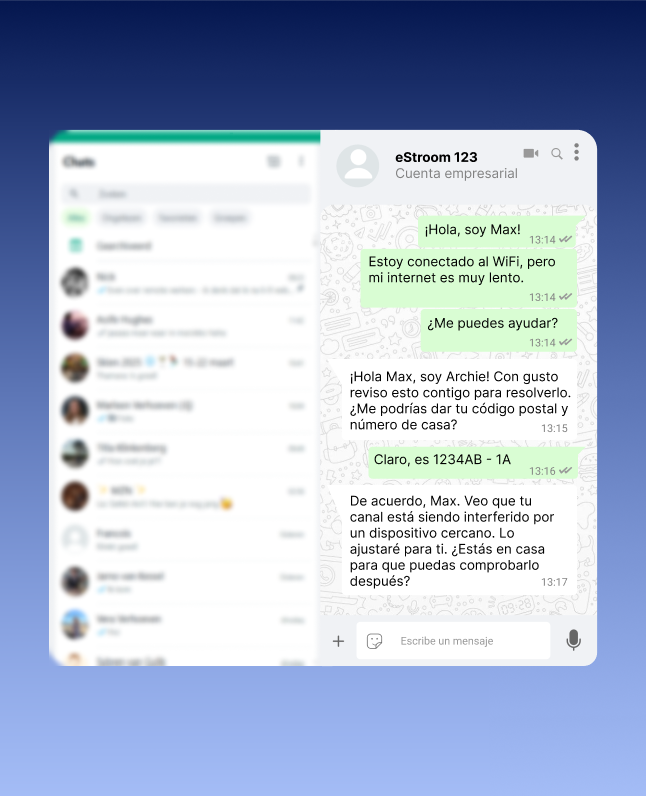
Product view of Archie Conversations for digital customer conversations
Archie Talks · Digital Conversations
Archie Acts

From the right answer to the right action.

A customer question is only resolved when the follow-up is handled correctly. With Action Center, you connect conversations with workflows and systems. This also enables Archie to help carry out tasks, with control wherever it is needed.

  • Less manual follow-up
  • Connect to existing systems
  • Confirmation for sensitive actions

Automate tasks and follow-up actions

Smart process automation

Automate recurring tasks and accelerate workflows. Archie can analyze incoming requests and forward them to the right department or employee, so your team spends less time organizing manually.

Automated customer solutions

Let Archie handle frequently asked customer questions with a suitable answer or a connected action. Which questions are resolved independently depends on the knowledge, configuration and connected processes.

Timely follow-up

Use connected workflows for updates, reminders and follow-up actions after customer contact. This keeps customers informed and reduces manual follow-up.

Connect systems and maintain control

Customer-specific actions with authentication and confirmation

Customer-specific actions can use authentication and explicit confirmation. Customers log in when a connected tool requires it and see the action before confirming. Passwords are not provided to the AI model; authentication and confirmation remain visible in the conversation history.

Integrations with existing systems

Connect Archie to CRM systems, ticketing platforms and other business software. Align data exchange and workflows with your existing processes.

MCP integrations

Connect QA Pro, Conversations and Agent Assist to external tools and systems via MCP. Administrators determine which tools are available and can test connections. Photos, scans and screenshots can be passed to suitable tools via a temporary secure link. The Action Center shows which tools support attachments.

Product view of the Archie Action Center for workflows and actions
Archie Acts · Action Center
Start with your day-to-day operations

Where do you want to make a difference?

The skills strengthen one another. Discover how they work together to address familiar customer service challenges.

GET UP TO SPEED FASTER

Get new colleagues off to a good start.

Give employees access to the knowledge and guidance they need while working.

Discover faster onboarding
CONSISTENT QUALITY

The same foundation. Stronger service.

Help teams and channels work from the same information and make areas for improvement visible.

Work towards consistent quality
SCALE SMARTER

More customer interactions. More control.

Combine support, digital conversations and automation to strengthen your team.

See how you can scale
Make it personal

Which skills fit your service?

Discuss where your team gets stuck. Together with an Archie expert, discover how knowledge, support, conversations and actions can come together in your organization.

Together with an Archie expert.
  • Nederlands
  • English
  • Deutsch
  • Français