Knowledge available in one place.
Bring articles, processes, and work instructions together. Employees can find relevant information without constantly switching between separate sources.

Bring articles, work instructions, and agreements together in a single, managed knowledge base. With Archie, employees can find relevant information, and your AI applications operate from the same Knowledge.
Part of Archie Knows. The knowledge base that underpins the entire AI platform.
How does the refund process work after a return?
Find the agreements and work instructions that match the question, even if someone uses different words.
Prepare new return arrangements
Have an article reviewed and decide when it will be available. Archie will not use it in responses until it is published.
Leveraging Knowledge from Existing Systems
Import items or keep externally managed content synchronized. Check in advance what will be included.
Interactive examples of searching, managing, and syncing. Illustration of how it works.
An appointment in a document, work instructions in another place, and an update in the team chat. A shared knowledge base helps turn all of that into a single, usable whole.
Bring articles, processes, and work instructions together. Employees can find relevant information without constantly switching between separate sources.
Decide who can view information, what gets published, and when changes take effect. This way, you can maintain control over the content that’s used.
Use the same Knowledge for employees, Agent Assist, and digital interactions. That’s how great support starts—with consistent, managed information.
An AI knowledge base combines knowledge management and smart search. Your team maintains the content; Archie helps find relevant information and make it available to the applications that use it.
Start with the articles, documents, and work instructions you already have. Import information or sync supported sources. Determine which content is relevant to your teams and customer inquiries.
Set up access, quality control, and publication. Have changes reviewed, plan new articles, and keep information available separately for different audiences.
Employees search for meaning and find information that matches their query. This same Knowledge forms the basis for responses in Agent Assist and digital conversations. Feedback and Insights help you continue to improve.
The four-eyes principle supports pre-publication review. Article Pre-Check helps with the evaluation of articles. Combine this with content management and feedback to keep the knowledge base up-to-date and consistent.
Archie searches for the meaning of a question. Weak search results and outdated articles are filtered out before they influence the answer. This makes it possible to do more than just search for an exact keyword.
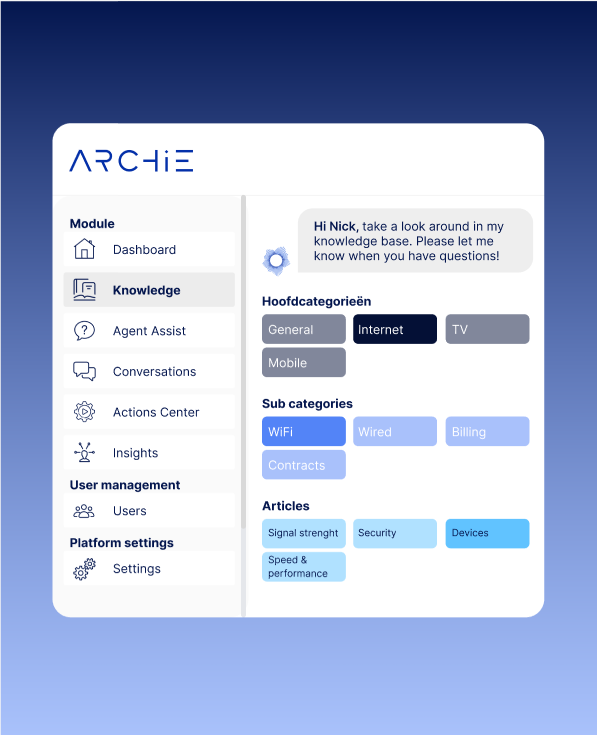
Knowledge needs to be maintained. Set aside time for reviews, make sure you receive important updates, and keep track of different languages in an organized manner.
Prepare articles in advance, have them reviewed, and schedule their publication. Until then, they remain hidden, and Archie does not use them in responses.
Mark updates as informational, important, or urgent. Display articles as pop-ups and, when necessary, request a read receipt. Make sure employees know what they need to know.
Manage articles, categories, and work instructions by language. Archie distinguishes between manual and automatic translations and gives you control over whether changes are overwritten.
With Knowledge Import & Sync, you can import data once or keep externally managed items synchronized. Preview what will be included and choose between manual or scheduled synchronization—full or incremental.
From knowledge to support. Let employees ask Agent Assist questions from the same Knowledge. Insights helps identify missing answers and opportunities for improvement.
Discover Agent Assist
Jumbo uses Archie to make articles, work instructions, and documents accessible to employees. Through a Q&A support system, they apply that knowledge during customer interactions. Feedback, quality control, and attention to missing information help further improve the knowledge base.
Read the Jumbo case studyFrom existing documents to a managed knowledge base. Here’s what you need to know before you get started.
Archie combines knowledge management with semantic search. The Knowledge can also be used by Agent Assist and in digital conversations to support responses. This allows you to manage the information that employees and AI applications rely on.
This isn't necessary for every source. You can import data or connect supported systems via Knowledge Import & Sync. Externally managed items can be synchronized and remain available in read-only mode, while you continue to maintain them in the source system.
Knowledge Import & Sync supports Salesforce Knowledge, Atlassian Confluence, Zendesk Guide, TOPdesk Knowledge Base, and Contentful. Together, we review the source structure and determine which articles, categories, translations, images, and attachments should be included.
Yes. You control which information is available to employees, customer experts, and customers. Knowledge intended for different target groups can remain separate. During setup, we tailor access to fit your workflow.
Combine content management with quality control, feedback, and synchronization. The four-eyes principle supports pre-publication review. You can schedule new articles in advance; they remain hidden until publication, and Archie does not use them in responses.
Yes. You can manage articles, categories, and work instructions by language. Archie distinguishes between manual and automatic translations, shows where translations are missing, and gives you control over whether to overwrite changes.
Knowledge is the managed knowledge base. Agent Assist supports agents by providing answers and work instructions based on that knowledge. They complement each other: you manage information centrally and make it available during customer interactions.
We start with your sources, your target audience, and your intended use. Together, we determine what’s needed in terms of setup, data import, access rights, and content management. In a personalized demo, we’ll outline a concrete approach to develop a tailored proposal and a realistic timeline.
Bring along a few articles, work instructions, or frequently asked questions. Work with an Archie expert to discover how you can make your knowledge more accessible to employees and AI.
Your practice as a starting point. Together with an Archie expert.