Every email in the right place.
Incoming emails, replies, and follow-up questions all stay in a single conversation. You can see the status and who is responsible, so colleagues know what still needs to be done.

Manage customer emails from a single inbox. MailGenius keeps conversations organized and provides AI-powered response suggestions, resources, and translations. Your team reviews and sends the emails.
Part of Archie Helps. AI support for your team's emails.
Which customer email needs attention?
View the request, status, and person in charge for each call.
I want to return an item. How does that work?
Dear Customer, you can request a return using our return form. Please include your order number and the item you wish to return. You will then receive instructions on how to proceed.
From the first email from a customer to completion.
Answers and follow-up questions remain in the same conversation.
The person in charge is visible.
Shipping activities are recorded in the history.
The current status remains on the screen.
Illustrative examples. The answers depend on your own Knowledge, processes, and structure.
A full inbox calls for a clear overview. Who is handling the inquiry, what information is needed, and has a response already been sent? MailGenius brings all those steps together.
Incoming emails, replies, and follow-up questions all stay in a single conversation. You can see the status and who is responsible, so colleagues know what still needs to be done.
AI helps draft a response. With source citations and a reliability rating, the employee can evaluate and supplement the draft in a targeted manner.
Track response times, SLAs, and shipping statuses. Sending a reply is just one step; keeping track of the entire conversation makes follow-up clearer.
MailGenius helps your team with their daily email tasks—from assigning new inquiries to reviewing responses and tracking follow-up actions.
Collect incoming emails in a shared inbox. Handle a conversation yourself or assign it to a colleague. Replies and follow-up questions stay together, with a single status and a single person responsible.
Review the suggested response and the sources used. Check whether the content matches the customer's inquiry, edit it as needed, and use a translation if that helps. The agent decides which response to send.
Track the status of the conversation, response times, and SLAs. See if a message has been sent and what the next step is. Completed conversations are intentionally reopened so that the status remains meaningful.
The employee reviews the AI-generated response, verifies the sources, and revises the answer as needed. A reliability indicator helps with this assessment, but does not replace a substantive review.
Every conversation has an assignee and a status. Conversations remain unread until someone opens them. This way, you work from a shared overview, and the team can see which questions still need attention.
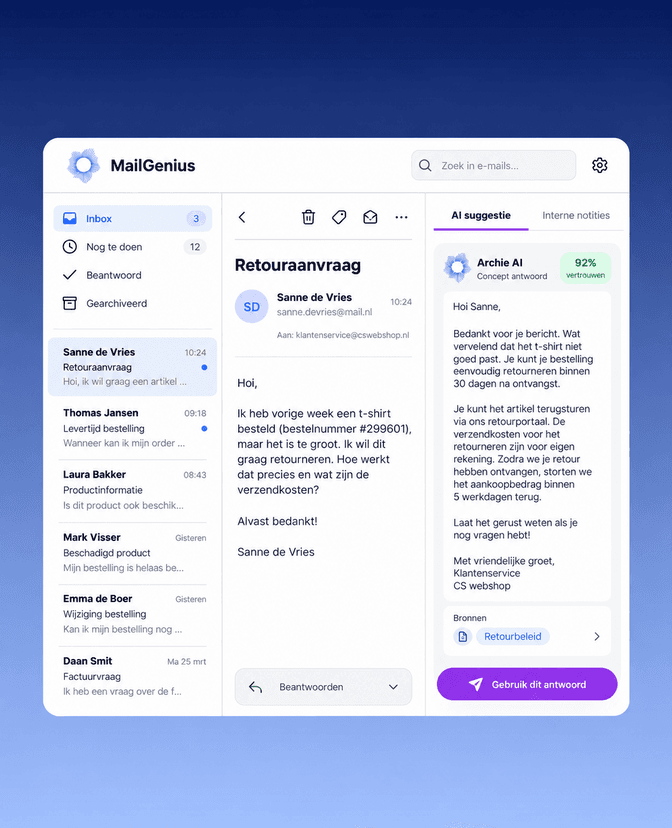
In addition to assistance with the response, your team needs control over drafts, attachments, and follow-up. These are all part of the same workflow.
Collaborate on responses from the shared inbox. An edit lock helps prevent colleagues from overwriting each other's changes.
Edit and translate the proposal, and review the attachments before sending it. Citations help clarify which information contributes to the response.
View assignments, status changes, and shipping activities in the timeline. Failed or uncertain deliveries are flagged so they can be addressed.
MailGenius supports Microsoft 365 and IMAP, including the handling of attachments. Together, we'll determine which mailboxes, access rights, and team arrangements are needed for your setup.
The same knowledge behind your answers. Connect email support to Archie’s managed Knowledge service from Archie. That way, your own information serves as the starting point for the agent.
Explore the AI Knowledge Base
At Simyo, information that was scattered or stored only in people’s heads has been consolidated into Archie. With Q&A support, employees can find relevant knowledge and work instructions during customer interactions. Read how Simyo Knowledge and Agent Assist in its day-to-day customer service operations.
Read the Simyo case studyFrom the shared inbox to responding to customers. Here’s what you need to know before you get started.
MailGenius helps customer service teams manage customer emails. It combines a shared inbox with conversation ownership, AI-powered response suggestions, source references, translation, and follow-up insights. It is part of Archie Helps.
This approach centers on AI support for employees. Archie suggests a response; the employee reviews, edits, and sends it. This leaves room to tailor the content and tone to the customer’s situation.
Yes. Teams work from a shared inbox and can assign conversations to one another. Each conversation has one person in charge and one status. When editing shared drafts, a lock helps prevent changes from being overwritten.
MailGenius supports Microsoft 365 and IMAP. It can also handle attachments. We tailor the setup to your mailboxes, access rights, and team processes, so it’s clear what you need to get started.
MailGenius helps employees translate their replies. The application is also available in German, French, Spanish, Italian, and Turkish. Employees can review and edit the translated draft before sending it.
Incoming emails, replies, and follow-up questions are consolidated into a single conversation. Your team uses statuses such as Open, In Progress, Waiting for Customer, and Closed. Closed conversations can be reopened by taking a specific action.
Yes. MailGenius gives your team insight into response times, SLAs, and send statuses. In the conversation history, you can track assignments, status changes, and send activities, among other things. This ensures that open questions and potential issues remain visible.
First, we’ll review your email volume, teams, mailboxes, and workflows. In a personalized demo, we’ll outline the specific setup you’re looking for. Based on that, we’ll discuss the approach, costs, and timeline.
Bring along a few typical customer emails. Work with an Archie expert to discover how MailGenius fits with your inbox, workflow, and response style.
Your practice as a starting point. Together with an Archie expert.