A clear answer as a first step.
Let Archie answer frequently asked questions using the information you manage. Customers can find answers to their questions, and employees can focus on situations that require more attention.

Answer customer questions from your own Knowledge, take related actions, and involve a staff member when necessary. Archie connects the conversation to the next step.
Part of Archie Talks. Linked to Knowledge, Action Center, and Insights.
My order is damaged. What should I do?
That's too bad. You can report a damaged item through the returns process. I'll help you figure out the next steps.
The answer depends on the information you provide.
Can you process a return for me?
I can prepare the return request for you. Please review the details and confirm the request before I submit it.
The customer sees what action is being performed before it is confirmed.
I'd like to speak with a staff member.
I'll forward your request to customer service. I'll include your question and the reason for the transfer so that a colleague can take over.
The request remains available in the conversation transcript.
Illustrative examples. Responses, actions, and follow-up will depend on your setup and availability.
Many questions follow a recognizable pattern. When information, customer context, and follow-up actions are scattered, each interaction requires time and attention all over again. That’s where an AI agent can support your team.
Let Archie answer frequently asked questions using the information you manage. Customers can find answers to their questions, and employees can focus on situations that require more attention.
Link customer inquiries to a related process. Examples include creating a case, sending a confirmation, or scheduling an appointment. The available actions depend on your system configuration.
Is a customer asking for a specific employee, or is there insufficient information? Use a clear handoff process that includes the request and the reason for it, so the call can be handled effectively.
Start with the questions your customers ask and the processes you use to help them. Archie uses your Knowledgeavailable customer context and associated actions to move the conversation forward.
Determine which questions Archie is allowed to answer and which Knowledge belongs to it. The agent checks whether the available information sufficiently supports the answer. It displays the sources on which the answer is based.
Have Archie prepare or execute a linked action as appropriate. Customer-specific actions may require the customer to log in. For actions with consequences, the customer can see what is happening and can provide explicit confirmation.
A request for human assistance halts the normal flow of AI responses and sends a handoff signal to the linked chat environment. The question and reason remain in the transcript. Tailor the follow-up to your staffing levels and business hours.
Archie checks whether available Knowledge and results from linked tools sufficiently support the answer. If not, the configured “No Answer” handling can be used. Transfer can also begin after a configurable number of unanswered questions.
When a customer is logged in to a connected portal, Archie can use verified data to provide an appropriate response. Examples include a contract, installation, or address. This context is limited to the individual conversation and expires when the customer logs out or when the data expires.
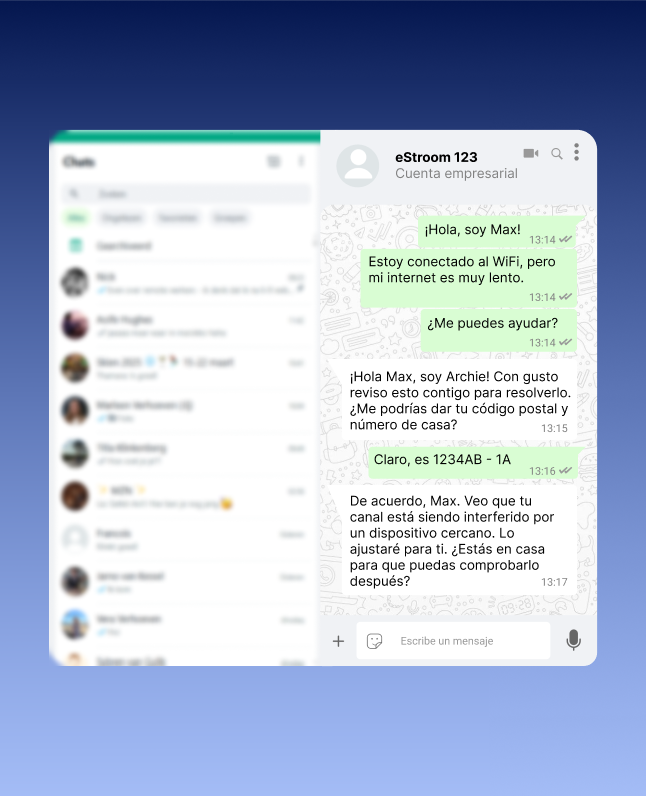
A useful response is tailored to the question, the language, and the situation. Archie integrates that support with the knowledge and processes your organization manages.
Have the AI agent and your employees work from the same controlled Knowledge. This helps minimize discrepancies across channels and makes the information behind responses easier to verify.
Help customers in their own language. In web chat, relevant images from knowledge base articles can supplement an answer—for example, when providing instructions, describing a component, or explaining a procedure.
Link actions to your existing processes. Use authentication when a tool requires it, and have customers explicitly confirm actions that have consequences. Authentication and confirmation remain visible in the conversation.
Archie can support digital conversations via web chat, WhatsApp, Messenger, and Instagram. We tailor the channels, integrations, and handoffs to your customer contact environment.
Learn from recurring questions. Insights highlights recurring questions, trends, and missing information. Use those signals to Knowledge and service.
Discover Archie Insights
At Xenos, customers use the Xenna chatbot to look up their order and indicate which item is damaged. An automated process for a refund or replacement then begins. In this way, Xenos links the customer’s request to the resolution of the issue.
Read the Xenos case studyFrom the customer's initial inquiry to a follow-up action. Here's what you need to know before you get started.
The Archie AI agent helps customers by providing answers based on your Knowledge and can support follow-up actions through integrated processes. If human assistance is needed, the conversation can be transferred to an agent. During setup, you determine which questions and actions are appropriate for the application.
At Archie, Knowledge, conversation context, and linked processes all come together. The agent can answer questions, use information from available sources, and initiate an appropriate action. The capabilities depend on the knowledge, access rights, and processes you connect.
Archie checks whether the answer is sufficiently supported by Knowledge the results from linked tools. If the support is insufficient, the configured “No Answer” route can be used. You can also specify the number of unanswered questions after which a transfer is initiated.
Yes. An explicit request for an agent stops the normal flow of AI responses and sends a transfer signal—along with the reason—to the linked chat environment. Whether someone is available immediately depends on your staffing levels, business hours, and setup.
For example, using linked processes, Archie can create a case, send a confirmation, or schedule an appointment. You determine which actions are available when setting up the system. For customer-specific actions, authentication and explicit confirmation can be used.
Archie can integrate with existing CRM systems, ticketing platforms, and other business systems through links and the Action Center. Together, we’ll determine which interfaces, data, and access rights are needed for your application.
Archie supports digital conversations via web chat, WhatsApp, Messenger, Instagram, and other platforms. Customers can communicate in their own language. We tailor the specific combination of channels, language settings, and transfer routes to your environment.
Start with the most common reasons for contact and the processes you use to handle them. In a personalized demo, we’ll review the necessary Knowledge, channels, integrations, and data transfers. Then we’ll finalize the approach, costs, and timeline.
Bring a few common customer questions with you. Work with an Archie expert to determine which questions you can automate, which processes align with this, and where human assistance is still needed.
Your practice as a starting point. Together with an Archie expert.